
Business Process Automation: A Strategic Imperative
In today’s rapidly evolving business landscape, organizations must continuously optimize their operations to remain competitive. Business Process Automation (BPA) has emerged as a critical initiative for forward thinking companies seeking to enhance efficiency, reduce costs, and improve service delivery.
For your business, automating routine processes can free valuable resources to focus on core business activities and innovation. Manual, repetitive tasks not only consume significant employee time but also introduce errors and inconsistencies that can impact service quality and customer satisfaction.
The digital transformation journey begins with identifying processes that can benefit from automation, followed by implementing appropriate technological solutions that deliver tangible business value.
Why Microsoft Power Platform?
Microsoft Power Platform offers a comprehensive suite of low-code development tools designed to enable rapid automation and application development with minimal technical expertise. This makes it an ideal solution for organizations looking to accelerate their digital transformation initiatives.
Key advantages of adopting Power Platform for business process automation include:
- Low-code/no-code development capabilities that empower citizen developers
- Seamless integration with Microsoft 365 ecosystem and third-party applications
- Rapid development and deployment, reducing time-to-value
- Advanced AI capabilities through Power Platform Copilot and AI Builder
- Enterprise-grade security and governance features
- Scalability to accommodate growing business needs
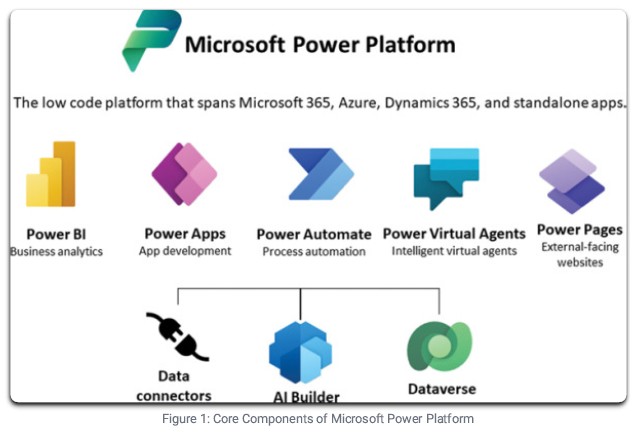
Microsoft Power Platform is a family of products designed to help organizations automate processes, build solutions, analyze data, and create virtual agents. It consists of five primary components that work together seamlessly while also integrating with Microsoft 365, Dynamics 365, and hundreds of other apps and services.
Power Apps
A low-code development platform for building custom business applications that can run on web and mobile devices. Power Apps enables citizen developers to create feature-rich applications without extensive coding knowledge.
Power Automate
A workflow automation tool that connects to hundreds of data sources and services, allowing users to create automated workflows between applications and services to synchronize files, get notifications, collect data, and more.
Power BI
A business analytics service that provides interactive visualizations and business intelligence capabilities with an interface simple enough for end users to create their own reports and dashboards.
Power Pages
A secure, enterprise-grade low-code platform for creating, hosting, and administering modern external-facing business websites that work seamlessly across web browsers and devices.
Microsoft Dataverse
A scalable data service and app platform that lets you securely store and manage data used by business applications. Dataverse provides built-in security, governance, and compliance capabilities.
AI Builder & Copilot
AI capabilities that bring intelligent automation to Power Platform, allowing organizations to add AI capabilities to workflows and apps without requiring data science expertise.
Latest Power Platform Features and Innovations (2025)
AI-Driven Development with Copilot
Copilot for Power Platform enables developers to build apps and automate workflows using natural language prompts, accelerating development time by up to 70%.
Advanced Document Processing
AI Builder now includes more sophisticated document understanding capabilities, enabling extraction of complex data from invoices, contracts, and other business documents.
Enhanced Proceess Minning
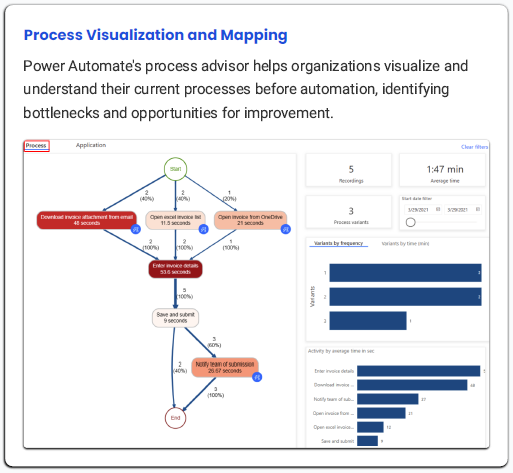
New process mining capabilities help organizations identify inefficiencies in their operations and recommend automation opportunities based on actual process execution data.
Cross-platform Integration
Expanded connectors and improved integration capabilities with thirdparty systems make it easier to build comprehensive automation solutions across your entire technology ecosystem.
Business Process Automation with Power Apps
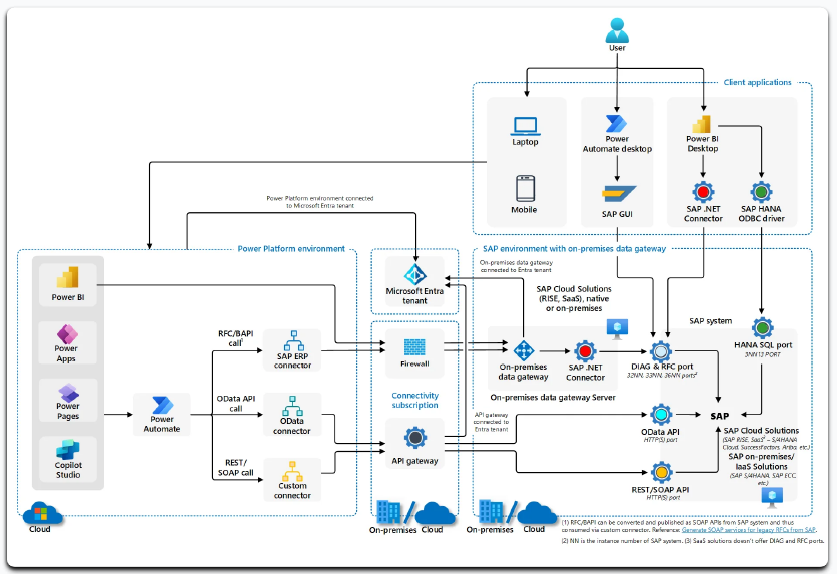
Business Process Automation (BPA) with Microsoft Power Platform enables organizations to transform manual, repetitive tasks into streamlined, automated workflows. This approach not only saves time and reduces errors but also enhances data quality and employee satisfaction by freeing staff from mundane activities.
Key Capabilities
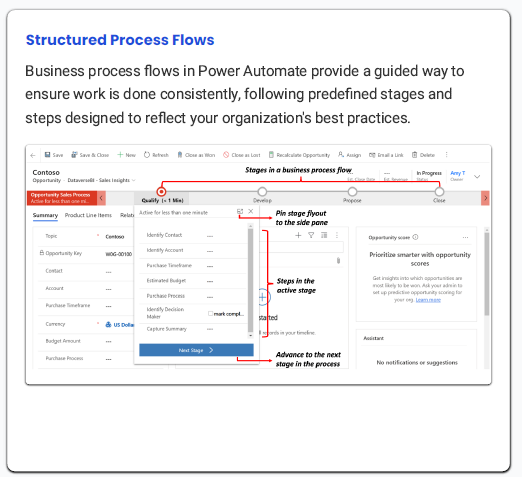
Common Automation Use Cases
Document Processing
- Automated data extraction from invoices and forms
- Document approval workflows
- Contract management and renewals
- 90% reduction in manual data entry
- 75% faster approval cycles
- Elimination of missed renewal deadlines
Customer Service
- Automated ticket routing and escalation
- Customer onboarding workflows
- Self-service portals with AI assistance
- 60% faster ticket resolution
- Improved customer satisfaction scores
- 24/7 customer support without staff expansion
HR Processes
- Employee onboarding and offboarding
- Time-off request management
- Performance review workflows
- 80% reduction in onboarding paperwork
- Standardized processes across departments
- Improved employee experience
Financial Operations
- Invoice processing and approval
- Expense management workflows
- Financial reporting automation
- 65% faster payment processing
- Reduction in payment errors by 95%
- Real-time financial visibility

The Power of AI in Process Automation
The integration of AI capabilities through Copilot and AI Builder takes business process automation to the next level, enabling:
Smart Document Processing
Extract and classify information from documents with advanced AI models that learn and improve over time.
Predictive Insights
Anticipate process bottlenecks and provide recommendations based on historical data patterns.
Natural Language Processing
Enable interfaces that understand user requests in plain language and automatically take appropriate actions.
Implementation Methodology
Our structured approach to implementing Power Platform-based business process automation ensures alignment with your strategic objectives while delivering rapid value. We follow a proven methodology that combines best practices in process optimization, application development, and change management.
Discovery & Assessment
Analyze current processes, identify automation opportunities, and establish success criteria
Solution Design
Design automated workflows, data models, and user interfaces based on business requirements
Development & Testing
Build solutions using Power Platform tools, conduct thorough testing with real users
Deployment
Roll out solutions with proper change management and user training
Governance & Optimizationt
Establish governance framework, monitor performance, and continuously improve
Establishing a Center of Excellence
To maximize the long-term benefits of Power Platform adoption, we recommend establishing a Center of Excellence (CoE) within your business. A CoE serves as the foundation for sustainable automation practices by:
- Providing governance and standardized practices
- Managing environments and security policies
- Offering training and enablement resources
- Monitoring app usage and performance
- Establishing data loss prevention policies
- Promoting reusable components and patterns

Start Small, Scale Fast
Begin with high-impact, low-complexity processes to demonstrate value quickly, then expand to more complex scenarios.
Embrace Citizen Development
Empower business users to build their own solutions while maintaining proper governance and security controls.
Focus on User Experience
Design intuitive interfaces and workflows that enhance user adoption and productivity.
Establish Data Governance
Implement robust data governance practices to ensure data quality, security, and compliance.
Continuous Improvement
Regularly review automation performance and user feedback to identify opportunities for enhancement.
Documentation
Maintain comprehensive documentation of all solutions to facilitate knowledge transfer and future maintenance.
Return on Investment Analysis
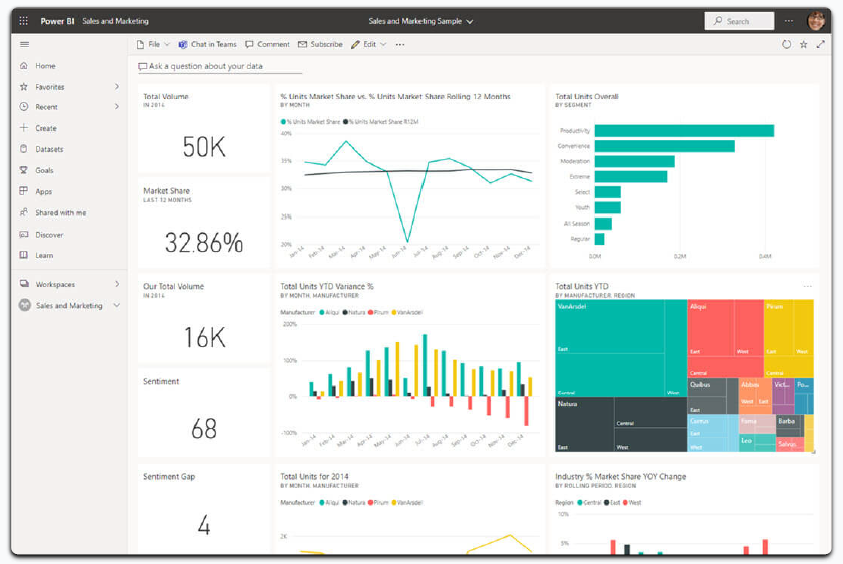
Implementing business process automation with Power Platform delivers significant return on investment through multiple value streams, including cost savings, productivity improvements, error reduction, and enhanced customer and employee experiences.
Return on Investment Analysis

Key ROI Metrics
Cost-Benefit Analysis
Investment Components
- Licensing Costs: Power Platform licenses scaled to user needs
- Implementation Services: Discovery, design, development, and deployment
- Training & Enablement: User and administrator training programs
- Governance & CoE Setup: Establishing governance frameworks
- Ongoing Support: Maintenance and enhancement services
Return Components
- Labor Cost Savings: Reduction in manual processing time
- Error Reduction: Lower costs from rework and corrections
- Process Acceleration: Faster execution of business processes
- Enhanced Decision-Making: Better insights leading to improved outcomes
- Scalability Benefits: Ability to handle growth without proportional cost increase
- Employee Satisfaction: Increased retention and productivity
Forrester Research Findings
According to a 2025 Forrester Total Economic Impact™ study commissioned by Microsoft, organizations implementing Power Apps and Power Automate realized:
- $6.7 million in net benefits over three years
- 74% reduction in app development costs
- 3.2 hours saved per week per user on average
- 188% ROI with payback in less than 6 months
Source: Forrester Total Economic Impact™ Study, 2025
Case Studies and Success Stories
The following case studies demonstrate how organizations similar to yours have successfully implemented business process automation using Microsoft Power Platform, achieving significant benefits and return on investment.
Global Financial Services Firm
Challenge: Manual customer onboarding processes taking 5-7 days, with high error rates and poor customer experience.
Solution: Implemented Power Automate workflows for document processing, verification, and approval, integrated with Power Apps for customer-facing interfaces.
Results:
- Reduced onboarding time from 5-7 days to less than 24 hours
- Decreased error rates by 92%
- Improved customer satisfaction scores by 37%
- Achieved 210% ROI within 12 months
Mid-Size Technology Services Provider
Challenge: Inefficient approval processes across departments causing project delays and resource allocation issues.
Solution: Created standardized approval workflows in Power Automate with Power BI dashboards for visibility into process performance.
Results:
- 75% reduction in approval cycle times
- Eliminated lost requests and approval bottlenecks
- Improved project kick-off times by 40%
- Saved approximately 1,200 person-hours annually
Retail Chain with 200+ Locations
Challenge: Inconsistent inventory management processes across locations leading to stockouts and excess inventory.
Solution: Developed Power Apps for store inventory management with automated alerts and replenishment workflows in Power Automate.
Results:
- Reduced inventory carrying costs by 23%
- Decreased stockout incidents by 64%
- Increased inventory turnover ratio by 18%
- Generated $2.4 million in annual savings
Healthcare Provider Network
Challenge: Paper-based patient referral system causing delays in patient care and revenue leakage.
Solution: Implemented digital referral management system using Power Apps with automated workflows and AI-powered document processing.
Results:
- Reduced referral processing time by 82%
- Decreased lost referrals by 95%
- Improved revenue capture by $3.2 million annually
- Enhanced patient satisfaction through faster care coordination
Success Factors
- Executive sponsorship and clear vision
- Cross-functional team involvement
- Focus on process optimization before automation
- Phased implementation approach
- Robust training and change management
- Establishing proper governance early
Common Challenges & Solutions
- Data quality issues – Implement data validation rules
- User resistance – Involve users in design process
- Integration complexity – Start with simpler integrations
- Governance concerns – Establish CoE from the start
- Scaling challenges – Build modular, reusable components